

Summary
How to resolve the error: "Cannot open company file [file name]. A required data file is missing. Check your data directory to be sure the files are there" when opening a data file or restoring from backup in Sage 50 Accounting.
Cause
- The SAI shortcut or SAJ folder is missing or was renamed
- The latest version isn’t installed
- The file is in a synced folder with cloud services like OneDrive, Google Drive, or Drop Box
- Files in the SAJ folder are hidden
Resolution
File is on Remote Data Access
- Re-download the file from Remote Data Access.
- If you’re having difficulties redownloading,
- Open the file on another user computer as a sysadmin in single-user mode
- Go to File, Remote Data Access, Pause Sharing then Resume Sharing
- Re-download the file on the problem computer again
- If you’re having difficulties redownloading,
- Save the file on C:\Sage.
Move the file to C Drive
- Copy the SAI file and the SAJ folder to a new folder in the C:\\ Drive.
- Verify that you can open the file now.
Restore from backup
- Restore from the most recent backup.
- Verify that the file opens without an error.
Disable antivirus and firewall
- Temporarily disable antivirus and firewall.
- Verify that the file opens.
- If the file opens, set up the antivirus to allow Sage 50 processes.
Verify that both the SAI file and SAJ folder are in the same location
- Go to the data file location.
- If either SAI file or SAJ folder is missing, locate it and move it back.
- Both files have to be in one place
- If you can't locate the SAI file or SAJ folder, restore from a backup.
Verify that the SAI file and the SAJ folder have matching names
- Locate the SAI file and SAJ folder using Windows Explorer.
- Make sure the names for both match.
- If they don't, rename them with the same name.
Check for missing files or folders in the SAJ folder
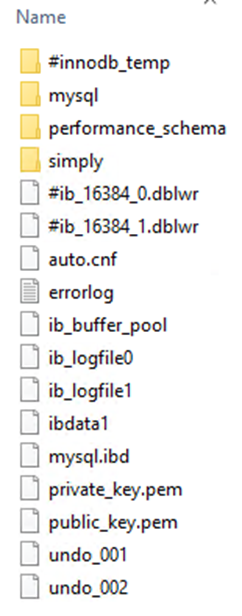
- If any of the above are missing, perform a Windows search for the missing files/folders.
- If you can't find these files in a Windows search, restore the company data from a backup.
Need more help?
 Africa
 Asia
Asia Australia
 France
 Ireland
 Kenya
Kenya Nigeria
 Portugal
 South Africa
 Spain
Spain United Arab Emirates
 United Kingdom
 United States
 Germany