

Summary
An overview of different Sage 50 Accounting editions and their compatibility.
Description
- There are three current file formats - Pro, Premium, Quantum
- Sage discontinued First Step in 2018
- To upgrade a First Step file to the latest version of Sage 50, you need a Pro version at the minimum
- The Sage 50 Accountants Edition isn't a file format. It's a universal version of Sage 50 that opens all three formats of Sage 50
- If you open a Sage 50 Pro file in Premium, you'll permanently convert the file to Premium
- Once you update a file, you can't go back to the previous edition
- Restore from backup to go back to the previous version if you upgrade accidentally
- If you open a Sage 50 Pro file in the Accountants Edition, it stays in Pro
- To upgrade the file, select Upgrade Company from the main menu
- You can check the file format of a data file by going to File, Properties

Determine which upgrade version you need
- If you have a version of Simply Accounting earlier than 5.0, you need Sage 50 Pro to upgrade
- Files below version 5 will need data repair as they are in DOS format. Contact Sage 50 Support for assistance
- Sage 50 products include a conversion wizard
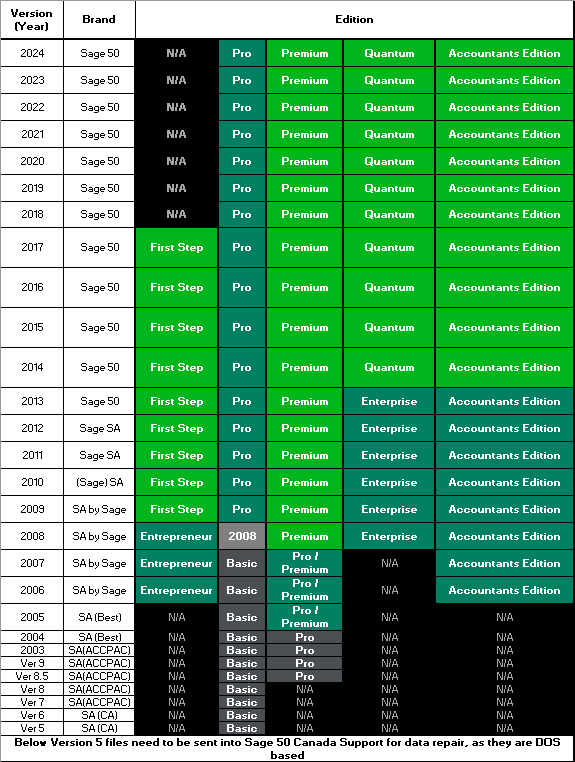
- A file from 2017 First Step will require 2019 Pro
- A file from Simply Accounting 2005 Pro is equivalent to and will require Sage 50 2016 Premium
- If your original file is in Simply Accounting 2005 Basic, you'll require Sage 50 2009 Pro or higher
- If you purchased the wrong version of Sage 50, call 1-888-261-9610 to exchange or upgrade it
- Data files from Simply Accounting 2007 or earlier require pre-converting to Sage 50 2014 or 2015 before upgrading
Need more help?
 Africa
 Asia
Asia Australia
 France
 Ireland
 Kenya
Kenya Nigeria
 Portugal
 South Africa
 Spain
Spain United Arab Emirates
 United Kingdom
 United States
 Germany