Error: "An unknown error has occurred" during conversion
Summary
Review the three options below to resolve the error "An unknown error has occurred. To protect your company data, Sage 50 will now shut down. Any unsaved data will be lost" when converting data in Sage 50 Accounting.
Resolution
Verify Windows Regional Settings
- Click the Windows Start button.
- Go to Control Panel, Region, Additional Settings.
- On the Numbers tab, set the Decimal symbol to a decimal point.

- On the Currency tab, set the Decimal symbol to a decimal point.
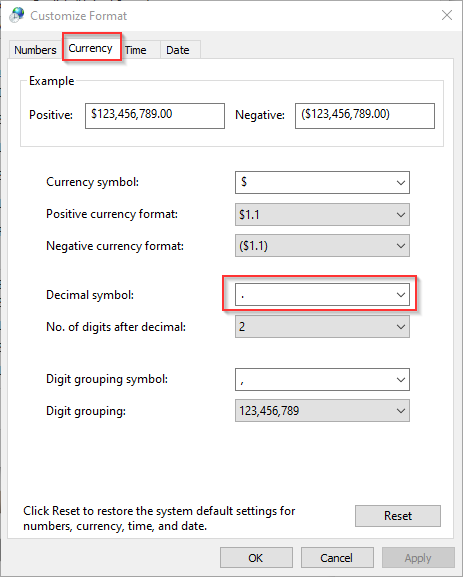
- Click OK.
- Try converting the file gain.
Check your data location
- Ensure that your data isn’t on One Drive, DropBox, or Google Drive.
See How can I tell if my files are synced to a cloud service? - If the files are in a cloud location, follow:
How do I copy my files from one location to another in Windows Explorer?
Run Advance Database Check
- Go to Maintenance, Advance Database Check, and click Yes.
- If Sage 50 is unable to resolve the errors, contact support for possible data repair.
Need more help?
Solution Properties
- Solution ID
- 221924750012901
- Last Modified Date
- Fri Jun 20 21:24:51 UTC 2025
- Attributes
-
Product DetailsIntegrated Product: Blueprints
- Views
- 0