ARCHIVED: How do I update my version to the newest version?
Summary
This article explains how to update your version of Sage 50 to the newest version.
Resolution
How to check if the product update is already installed or not?
- Open any company file in Sage 50.
- Go to Help, About Sage 50.
- To view the date of the last tax update, click Support info.
- View the Release number.
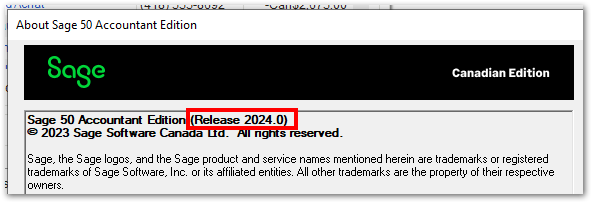
- Verify against the latest version of Sage 50 that Sage 50 has released in article How do I know if I am using the latest version with the latest tax tables for payroll?
- Click on Support Info...
- The version installed will have the tax tables equal to the Payroll taxes Effective field.

General information
- All customers can download product updates that include product enhancements at no additional charge.
- Only customers who subscribe to Sage Business Care Plan will get automatic product updates.
- Receiving a CD requires a chargeable shipping subscription in addition to your current subscription plan by contacting Customer Service at 1-888-222-8985.
- Customers who wish to subscribe or update their lapsed subscription should contact Customer Sales at 1-888-261-9610.
- Both Automatic and Manual update procedures require an Internet connection.
Method 1: Automatic update through Sage 50
- Open the sample company in the most recent version you have installed. Follow How do I open the sample company?.
- See article How do I install automatic silent downloads?
Method 2: Manual download
- The updates available for manual download from Sage 50: Download Portal.
- Download the update that you require to your computer.
- Once the download is complete, close Sage 50 if it is open and run the installer file from your download location.
Method 3: Install update from a CD
- Insert the produce update CD into your CD drive.
- If the Auto-play screen does not appear, go to Computer or This PC on your machine and double-click the DVD or CD-drive, and then double click the launch.exe file.
- It will ask which version of Sage 50 you are updating. Please select the version you are using.
- Follow the prompts to install the update to your Sage 50.
Need more help?
Solution Properties
- Solution ID
- 220924150010088
- Last Modified Date
- Tue Oct 31 11:46:02 UTC 2023
- Views
- 0