

Summary
This article explains how to use the new payroll deduction features released in 2024.0 for "Rates x Hours worked" and "Percent of Hourly Rate" in Sage 50 Accounting.
Resolution
- Ensure that all Sage 50 windows are closed by going to View, Close All Other Sage 50 Windows.
- Go to Setup, Settings, Payroll, Deductions.
- You can choose to rename an unused Deduction by clicking on the EnFr box. Click OK when finished.
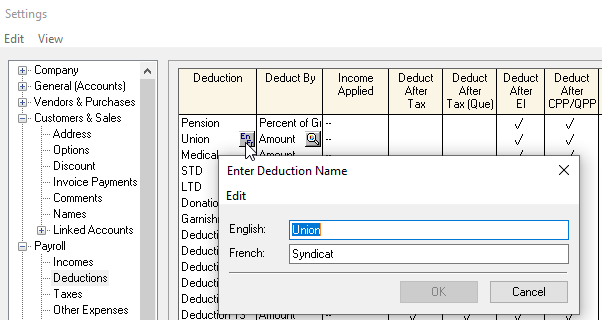
- Ensure all the required checkboxes are checked off according to your accountant or CRA requirements

- Click the magnifying glass icon in the Deduct By field
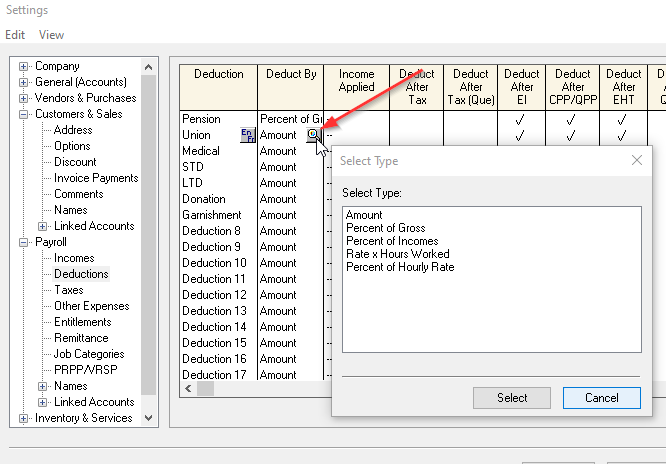
- On the Select Type window, select either Rate x Hours Worked or Percent of Hourly Rate as desired and click Select.
- Under the Income Applied column, click the magnifying glass icon to associate the appropriate income names to the Deduct By criteria by checking or unchecking the incomes. Click Select and OK when finished.

- Go to one of your Employee Records and click on the Deductions tab. Enter either the Rate per Hour or Percentage of Hourly Rate amount as required

- Create a paycheque and view the results on the Deductions tab and reports by doing a CTRL +J before clicking Process.
 Africa
 Asia
Asia Australia
 France
 Ireland
 Kenya
Kenya Nigeria
 Portugal
 South Africa
 Spain
Spain United Arab Emirates
 United Kingdom
 United States
 Germany