

Summary
Print vendor T4A forms using Sage 50 Accounting Pro version and higher.
Resolution
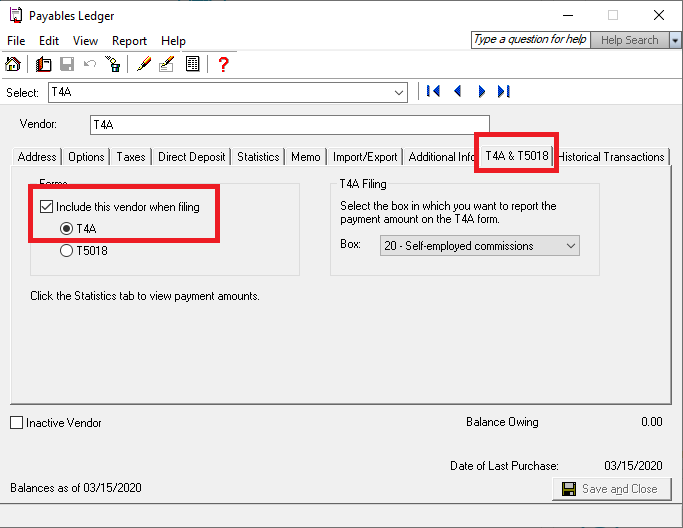
Enable the Vendor for filing the T4A
- Select Payable, Vendors, View Vendors.
- Select the Vendor for filing the T4A.
- Select the T4A & T5018 tab.
- Enable the option to Include this Vendor When Filing T4A.
Print the T4A
- Click Reports, Vendors & Purchases, Print T4A Slips.
- If the Payer/Company Address doesn’t populate, the form is working as designed and the address isn't required
- If the T4A or T4A Summary don't print, go to Setup, Reports and Forms, Government Forms, Vendors, and ensure the correct printer is selected
- The CRA requires a printed T4A for each employee and a T4A Summary if you aren’t planning to do electronic filing.
- Check the Print CRA copy and Print CRA T4A Summary on the T4A Slip and Summary Options window
 Africa
 Asia
Asia Australia
 France
 Ireland
 Kenya
Kenya Nigeria
 Portugal
 South Africa
 Spain
Spain United Arab Emirates
 United Kingdom
 United States
 Germany